Screen for spatial neglect in seconds
Hand the patient your iPad, let them mark the centre of a line, and read a precise deviation instantly.
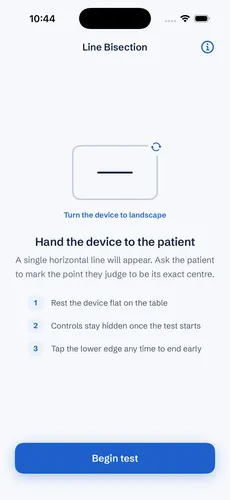
A classic bedside test for visual-spatial neglect
Line bisection is one of the oldest and most reliable probes for hemispatial neglect. The patient is shown a single horizontal line and asked to mark the point they judge to be its exact centre. A mark that consistently lands to one side reveals how attention is distributed across space. Line Bisection turns your iPad into a precise, always-ready version of the pen-and-paper test — measuring the deviation from true centre down to the millimetre. The app measures and reports — it doesn't interpret or diagnose.
A simple four-step workflow
Every assessment follows the same process, so results stay consistent from patient to patient.
Rest the device flat and review the short instructions before you begin.
A single horizontal line appears. Ask the patient to mark its exact centre.
The app captures the marked position and compares it to the true midpoint.
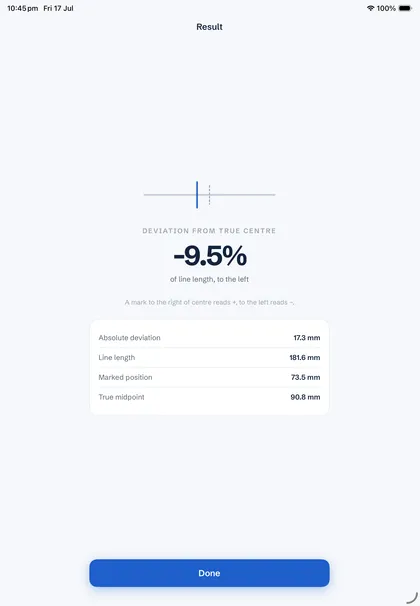
See the percentage deviation and direction, plus the exact figures in millimetres.
Clear numbers, no interpretation required
The headline shows the deviation from true centre as a percentage of line length, with direction — a mark to the right reads +, to the left reads −. Below it, the absolute deviation, line length, marked position and true midpoint are all listed in millimetres, ready to record.
Private by design
No test data is stored on the device. Each result is shown once for you to record, and nothing is saved or uploaded — patient privacy is fully protected, with no account and no cloud, ever.
Who it's for
A quick bedside screen for hemispatial neglect after stroke or injury.
A consistent, quantified record of spatial attention across assessments.
Track deviation over a course of therapy to gauge recovery.
Common questions
Just an iPad or iPhone. Rest it flat, hand it to the patient in landscape, and you're ready to run the test.
The app compares the patient's marked position to the true midpoint of the line and reports the difference as a signed percentage of line length, plus the exact figures in millimetres.
No. Line Bisection measures and reports the deviation — the clinical interpretation is always yours.
No. Nothing is saved to the device or uploaded. Each result is shown once for you to record, then it's gone. Read our privacy policy for details.
Line Bisection is a one-time purchase on the App Store — no subscription and no recurring fees. See the App Store for current pricing.
Add it to your exam today
Download Line Bisection and start screening for spatial neglect in seconds — a one-time purchase, no subscription required.