A Simple Test of Visual Sensitivity
Hand the participant your iPad and run a standardised edge-detection contrast test. The app reports an objective contrast sensitivity score in decibels — the clinical interpretation is always yours.
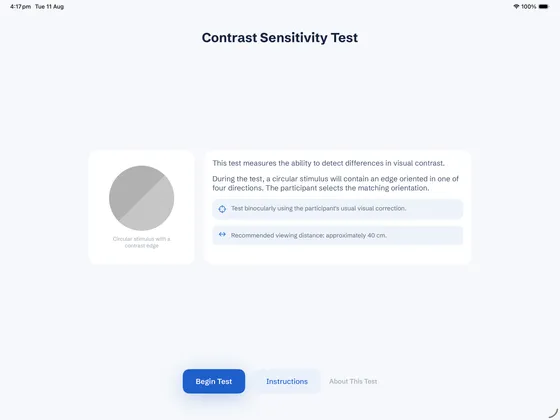
A standardised, four-alternative forced-choice edge test
A circular stimulus contains a straight edge in one of four orientations — vertical, horizontal, or one of two diagonals — and the participant selects the matching orientation from four large response buttons. The stimulus method is based on the edge-detection approach used by the Melbourne Edge Test, rendered as a plain circular disc, with contrast stepping down through a fixed sequence as the participant answers correctly. Contrast Sensitivity measures and reports a score — it doesn't interpret or diagnose.
Guided, standardised administration
Every assessment follows the same process, so results stay consistent from participant to participant.
An unlimited, unscored practice round with an unmistakably high-contrast stimulus lets the participant learn the task before anything is counted.
The app standardises screen brightness for the test, then restores the iPad's own setting automatically afterwards.
Contrast steps down through a fixed 15-level sequence as the participant answers correctly, stopping after a short run of incorrect responses.
A single dB score appears, with a published reference chart shown alongside for context only.
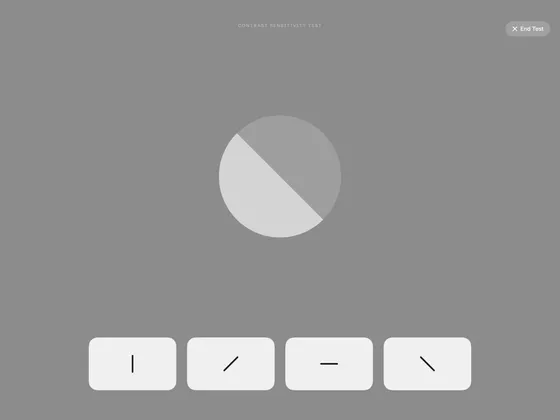
Nothing competes with the stimulus
The active test screen is neutral grey, with no branding, no score, and no progress shown to the participant. A clinician can end an active test at any time via a confirmation step, without producing a misleading partial result.
A clear number, no interpretation required
The result is reported as a single contrast sensitivity score in decibels. Alongside it, a reference chart shows published age-band contrast sensitivity ranges, purely as independent contextual information — the participant's own result is never plotted against it or automatically classified. The result is shown once, on screen only — for privacy reasons, nothing is saved or uploaded.
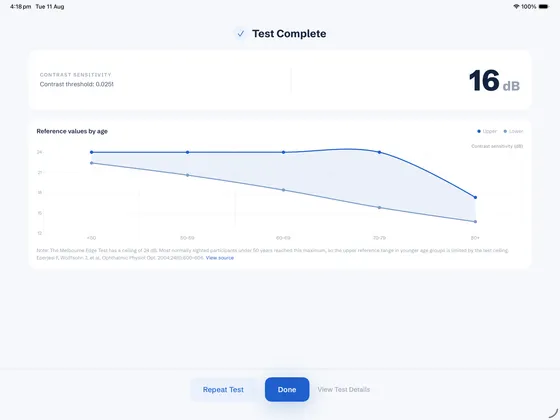
Nothing stored, ever
Every trial — contrast level, orientation shown, orientation selected, correct or incorrect, response time — and the final result exist only in the app's working memory, for as long as the Result screen is on screen. Nothing is ever written to a file or database, and nothing leaves the device. No patient identifiers and no age are ever collected or requested.
Who it's for
An objective, repeatable contrast sensitivity figure to sit alongside a broader falls-risk workup.
A quick bedside measure of contrast sensitivity, with age-band reference values for context.
Track a standardised score across a course of care, without the cost of dedicated hardware.
Common questions
An iPad, held in landscape at approximately 40 cm from the participant. Contrast Sensitivity is an iPad-only app — iPhone support is not available yet.
No. The app reports a single objective contrast sensitivity score in decibels, alongside a published reference chart shown purely for context. It never plots the result against the chart, and it never generates a percentile, a normal/abnormal label, or a falls-risk category — that judgement is always yours.
The app measures contrast sensitivity using an edge-detection method based on the Melbourne Edge Test, rendered as a plain circular disc. Its stopping rule, calibration approach and viewing conditions differ from the published normative study, so results should not be treated as clinically equivalent to it — the reference chart is shown for context, not as a direct comparison.
The app never asks for a name, identifier, or age. The result and every trial exist only in the app's working memory while the Result screen is showing — nothing is ever written to disk, and none of it is uploaded or transmitted. Read our privacy policy for details.
No — the result and its trial-level detail exist only while that Result screen is on screen. The moment you tap "Repeat Test" or "Done", or navigate away any other way, it's discarded immediately and can't be recovered. Note the score down before moving on if you want to keep a record.
Contrast Sensitivity is a one-time purchase on the App Store — no subscription and no recurring fees. See the App Store for current pricing.
Add it to your exam today
Download Contrast Sensitivity and start running a standardised edge-detection contrast test at the bedside — a one-time purchase, no subscription required.