
Score the Stroop test with confidence
Administer the Stroop colour-word interference test in Verbal or Visual mode, with real on-device speech scoring, full practitioner review, and clear results — nothing ever leaves the device.
A classic test of cognitive interference, digitised
The Stroop test asks a simple question with a surprisingly hard answer: name the ink colour a word is printed in, not the word itself. When the word and the ink disagree — the word "RED" printed in blue — naming the ink takes measurably longer. That slowdown, the Stroop interference effect, is one of the most widely used bedside probes of attention and executive function. Stroop Test turns an iPhone or iPad into a precise, always-ready version of the test, in verbal or touchscreen response mode. The app measures and scores — it doesn't interpret or diagnose.
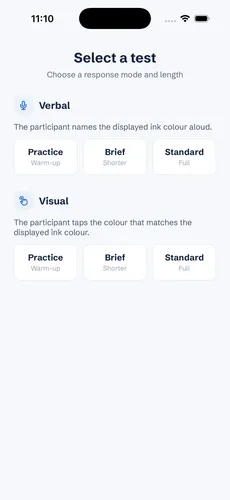
Verbal or Visual, same underlying test
The participant names the ink colour aloud. The app records the response and classifies it automatically using on-device speech recognition, with automatic voice-onset timing.
The participant taps the colour that matches the displayed ink colour on a touchscreen response grid. Scored instantly from the tap target and reaction time.
Practice, Brief, and Standard lengths are available in both modes — Practice is a short warm-up and isn't included in scored results.
A workflow built for real administration
From choosing a test to reading the result, every assessment follows the same clear process.
Pick Verbal or Visual response mode, then Practice, Brief, or Standard length.
Hand the device over or start recording — the app measures every response and its timing automatically.
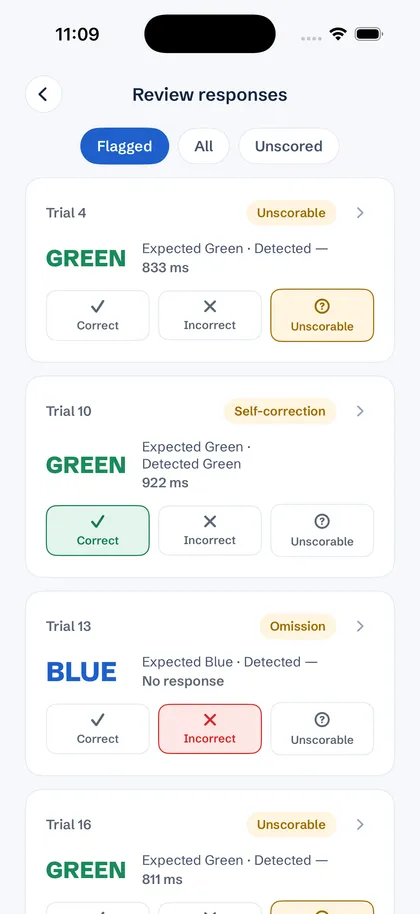
Replay audio, confirm or override any classification, and flag anything clinically relevant.
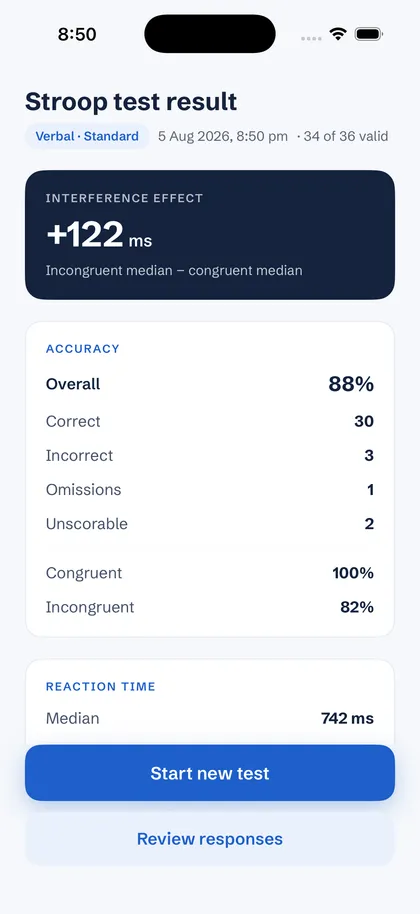
See accuracy, reaction-time statistics, and the Stroop interference effect, clearly labelled.
Clear scoring and timing, never a diagnosis
The headline is the Stroop interference effect itself — incongruent versus congruent reaction time — alongside a neutral-adjusted variant. Below it, accuracy and reaction-time statistics break down by condition, so nothing about what was actually administered is ever ambiguous.
Every trial, reviewed your way
Automatic scoring gets you most of the way there — review is what makes it trustworthy. Jump straight to what needs a second look, listen back to the actual response, and make the final call.
Reliability and data integrity
Private by design
Speech recognition happens entirely on-device using Apple's Speech framework — nothing is ever sent to a server. There's no account, no cloud, and no analytics or advertising SDKs of any kind.
Who it's for
A consistent, quantified measure of attention and executive function across assessments.
A quick, repeatable bedside probe of cognitive interference and processing speed.
Precise, timestamped trial-level data with full protocol labelling for every result.
Common questions
An iPhone or iPad. Choose a response mode and test length, and you can start administering straight away.
No. Stroop Test doesn't display a diagnosis, an impairment classification, a treatment recommendation, or any normative comparison. It captures and scores responses — the clinical interpretation is always yours.
On-device speech recognition classifies most responses correctly, but accent, pronunciation, speech impairment or background noise can affect it, like any speech recognition. That's why every trial — including the audio itself — can be reviewed and, if needed, overridden by the practitioner with one tap.
Recordings never leave the device. Speech recognition runs entirely on-device, and clips are kept only temporarily, for review. Read our privacy policy for details.
Not yet — there's no export or cloud sync in the current version. Get in touch if that's something you need.
Stroop Test is a one-time purchase on the App Store — no subscription and no recurring fees. See the App Store for current pricing.
Add it to your exam today
Download Stroop Test and start administering the colour-word interference test at the bedside — a one-time purchase, no subscription required.